
Pivotal Tasks: powerful yet simple
The power of a full-featured task manager, without complicating your day. An interface designed to get straight to the point: edit tasks in place, organize projects by goals and track specifications in Document view. Your AI agents help when you need them.
Organize your day
Keep the essentials within reach: edit tasks in place, find your priorities and postpone the rest without losing anything.
Ultra-fast inline editing
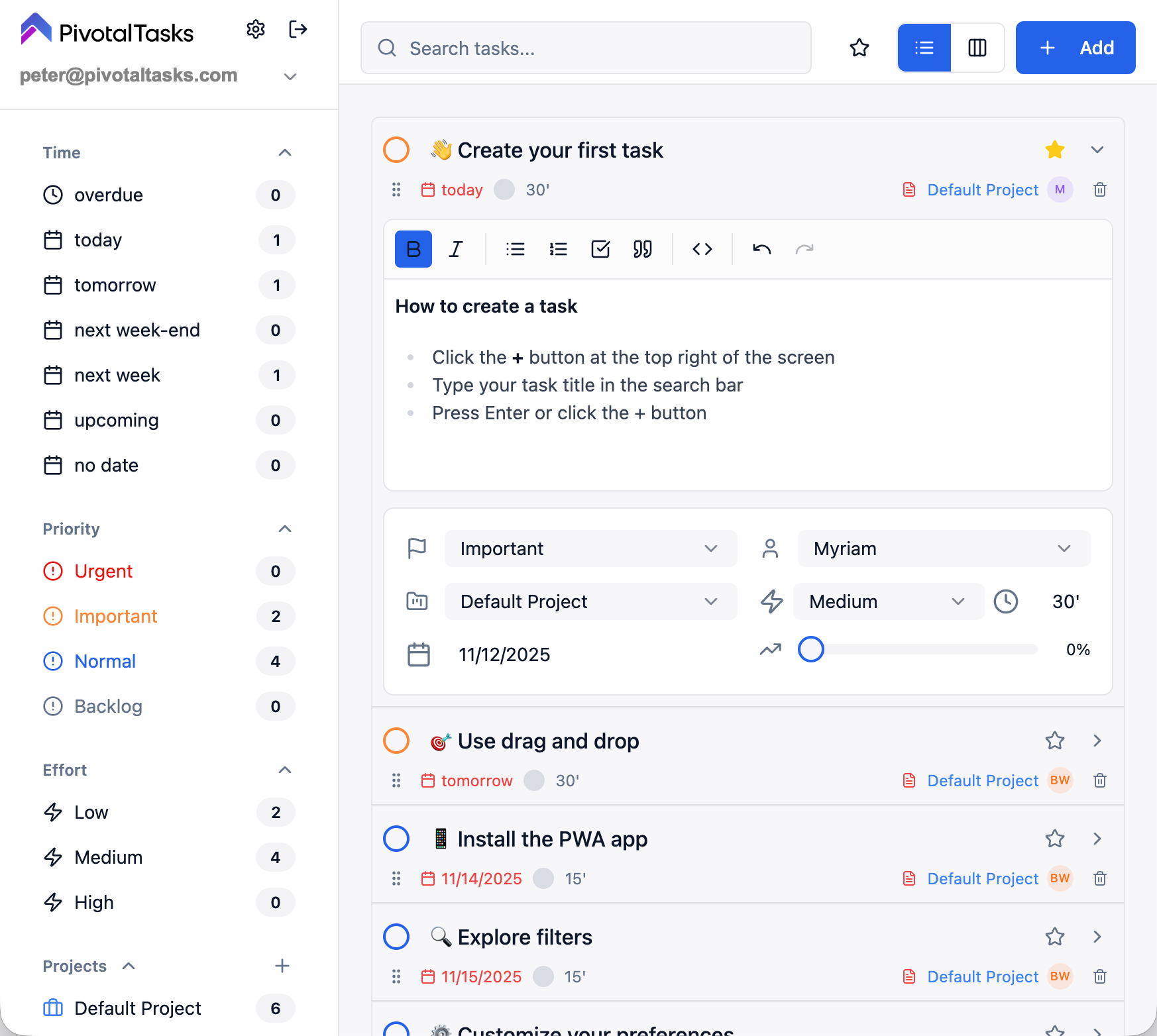
Edit titles, descriptions, dates and priorities right in the view. Zero popups, zero friction.
Snooze: stay focused without forgetting
Set aside a task that does not need attention now: it leaves the active list and returns on your chosen date. Snooze for one day, two days, one week or 30 days, until its due date or a custom date. The snoozed-task filter lets you find and reactivate tasks at any time.
Permanent tasks
Keep ongoing tasks visible alongside today's work. Your long-term goals and routines stay in sight without having to recreate them every day.
Organized backlog
Keep ideas and future tasks in a dedicated space, separate from today's list. Stay focused on what needs doing now without losing what comes next.
Stars for focus
Star the tasks you want to concentrate on. The star filter shows only that selection, keeping your current focus separate from priority levels.
Priorities
4 levels: Urgent, Important, Normal, Low.
Drag & drop and Markdown
Reorganize tasks by drag and drop and write rich descriptions with formatting, lists and links.
Links and context in tasks
Add links to the description to keep documents and resources alongside the work to do. Text search in titles and descriptions helps you find that context again.
Filter by project
Show a project's tasks to concentrate on one context. Combine this filter with an assignee or stars to narrow down your selection.
Filter by assignee
Find tasks assigned to a person, including yourself. Combine it with the project filter to see who is doing what in the context you care about.
Filter by effort
Select tasks by estimated effort level: low, medium, high or intensive. Spot smaller tasks or work that needs more time without scanning the whole list.
Email-to-task
Create tasks directly by sending an email.
Run your projects
Move from a simple list to a structured project without switching tools. Goals, progress and specifications stay together in one place.
Project goals
Structure your projects with colored goals. Assign a task to one or more goals by drag and drop or from its details, and find the related tasks with a click.
Document view
Bring your functional specifications together in a view organized into chapters by goal. Read and edit task descriptions, then track completed tasks and the total for each chapter.
Dependencies and automatic due dates
Link tasks that depend on one another to organize their sequence. Due dates are automatically adjusted according to those dependencies, without having to reassign them one by one.
Multi-projects
Organize your tasks by projects with color codes.
Visual progress
Customizable labels (Todo, Specifications, In progress, Review, Done) and progress calculated automatically from checked items in the description.
Table / List view
Scan tasks in rows and edit their information in place. Filters keep you in the right project or focused on one person's tasks without losing the overview.
Kanban view
See tasks as cards grouped into columns. Choose the grouping that suits your work: priority, due date, project, assignee or effort.
Subtasks and progress
Break a task into checklist steps in its description. Step counts and completed checkboxes help you track progress, while subtasks stay together with the parent task's context.
Effort: a duration and a level
Enter an estimated duration in minutes, hours or days. Pivotal Tasks derives a low, medium, high or intensive effort level using thresholds you can adjust. The length of a working day is configurable too.
Work with your AI agents
Your AI assistants read and update your tasks directly, no copy-pasting.
MCP setup guideNative MCP server
Connect Claude, ChatGPT, Gemini, Cursor or Dust to Pivotal Tasks with https://mcp.pivotaltasks.com/mcp. Your agent can read, search, create, edit, complete and delete tasks, and manage projects and sub-tasks.
Sign in with your account
The agent connects with your Pivotal Tasks account: no access code to copy, and you stay in control of what it can do.
Real-time collaboration
Share projects and tasks, invite by email, manage members and sync work in real time.
Multi-accounts
Manage several workspaces from one interface and switch instantly between personal and professional.
Everywhere, even offline
A fast, secure app on desktop and mobile.
Installable app
Use Pivotal Tasks as a native app on mobile and desktop.
Offline mode
Work without a connection; sync happens automatically.
Encrypted data
Your data is encrypted in transit (HTTPS/TLS) and at rest.
Themes
Light mode, dark mode and automatic adaptation.
Multilingual
Interface available in French, English and Spanish.
Real-time Linear sync
Synchronize your Linear issues with Pivotal Tasks in real time and work them next to your other tasks.
Ready to try it?
Create your account in a minute and organize your day today.
Create my free account